---
title: Key indicators
description: Quick check-ins in Intellispark help you capture key indicators of students’ social-emotional health and well-being.
---
[Skip to content](https://support.intellispark.com/knowledge/key-indicators#main-content)
[Request help](https://support.intellispark.com/knowledge/kb-tickets/new?hsLang=en)
![logo horizontal.png\]](https://support.intellispark.com/hs-fs/hubfs/IS%20Brand%20-%20Logos,%20Favicons/logo%20horizontal.png?height=40&name=logo%20horizontal.png)
Open main navigation
Close main navigation
- [Request help](https://support.intellispark.com/knowledge/kb-tickets/new)
- [Go back to Intellispark](https://app.intellispark.com/)
[Go back to Intellispark](https://app.intellispark.com/)
How can we help?
- There are no suggestions because the search field is empty.
1. [Help Center](https://support.intellispark.com/knowledge?hsLang=en)
2. [Knowledge Base](https://support.intellispark.com/knowledge/knowledge-base?hsLang=en)
# Key indicators
## Quick check-ins in Intellispark help you capture key indicators of students’ social-emotional health and well-being.
Intellispark provides several on-line check-in activities that you can use to collect feedback from students about their social-emotional development, well-being, relationships, engagement, and more. These check-ins automatically calculate several key indicators that appear on the [Student Hub](https://support.intellispark.com/knowledge/student-hub?hsLang=en) and are are scored as low, moderate, or high.
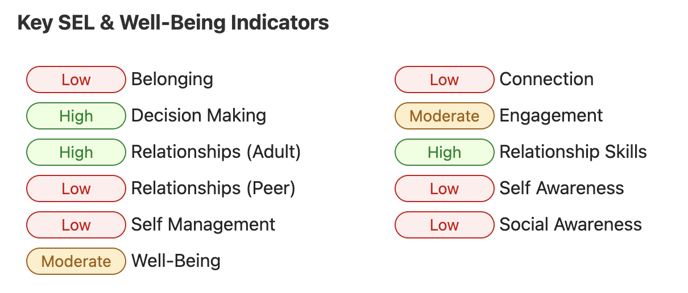These indicators are not intended to provide precise measurements or support high-stakes decisions. They are intended to be a supplementary tool to help quickly identify potential issues that may need further investigation and follow-up.
- [Getting Started](https://support.intellispark.com/knowledge/getting-started?hsLang=en#main-content)
- [Communications](https://support.intellispark.com/knowledge/getting-started?hsLang=en#communications)
- [Products and Services](https://support.intellispark.com/knowledge/getting-started?hsLang=en#products-and-services)
- [Knowledge Base](https://support.intellispark.com/knowledge/knowledge-base?hsLang=en#main-content)
- [Check-ins and surveys](https://support.intellispark.com/knowledge/knowledge-base?hsLang=en#check-ins-and-surveys)
- [Security & Privacy](https://support.intellispark.com/knowledge/security-privacy?hsLang=en)
- [FAQ](https://support.intellispark.com/knowledge/faq?hsLang=en)
[](https://intellispark.com)
Copyright © 2026, Intellispark Inc.